Your windows, your layout.
Drag a frame to move it, grab the corner to resize, or use the menu to snap and zoom. Select a window to bring it to the front.
A whole desktop in your terminal
Overlapping windows. Sessions that keep running. Kitty graphics and Silkie extensions, all in one terminal.
Named for Odin’s high seat: a place to survey your world. The spirit of DESQview, with a modern terminal underneath.
 your desktop companion
01 / Your workspace
An editor here. A shell there. A picture wherever you need it. Move, resize, raise and overlap windows on a single terminal desktop.
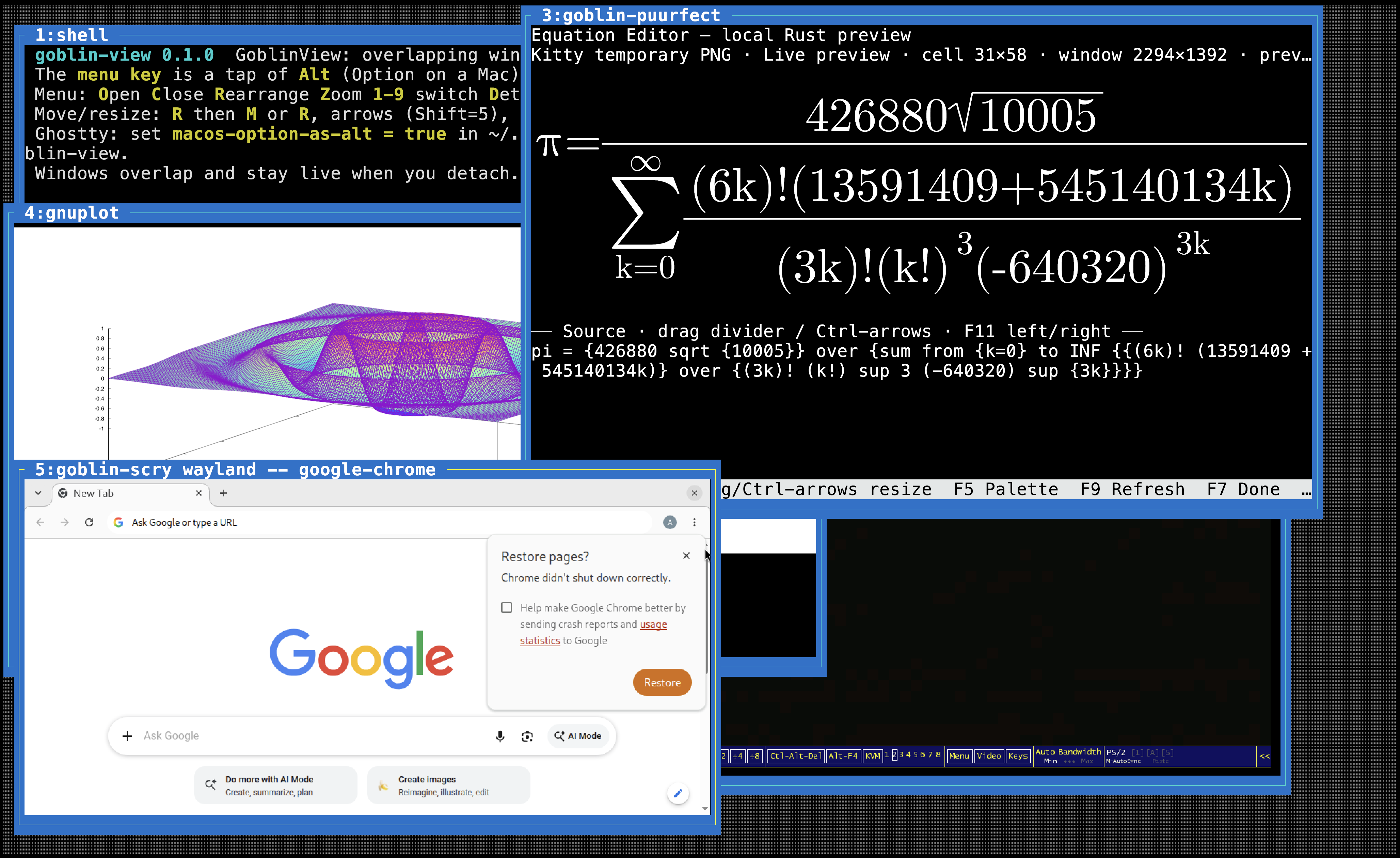
goblin-scry, alongside a shell. Text and graphics in one overlapping workspace.View full resolution Drag a frame to move it, grab the corner to resize, or use the menu to snap and zoom. Select a window to bring it to the front.
Each window has its own terminal state and scrollback. Detach from the desktop while shells, editors and long-running jobs carry on.
Attach from multiple terminals. Smaller clients follow the focused window through a viewport; the desktop uses the largest attached size.
02 / Beyond the character cell
Your programs talk to a terminal inside every window. Odin Seat keeps their state separate, translates coordinates and carries supported features through to the terminal you attach from.
Enhanced keyboard input, inline graphics, styled text, clipboard access and file transfer. Image placements move and clip with their windows.
Capability queries, tablet input, gestures, pixel scrolling, display information and frame feedback. Input follows the window where a contact began.
Use a terminal that supports the features you need. Kitty and sixel images are emitted in the host’s format; text-only clients omit images. Silkie extensions are offered when an attached host advertises them. A monochrome mode supports e-paper displays.
03 / A familiar rhythm
Run odin-seat to create a session or return to an existing one. The menu is an Alt tap away.
On terminals that swallow an Alt tap, use Ctrl + \. In Ghostty on macOS, set macos-option-as-alt = true so Option reaches the menu.
TAP Alt, RELEASE, THEN…
04 / Make yourself at home
Get a package for macOS, Debian or Ubuntu, or build from source with a C++23 compiler, Make and zlib.
The package and command are odin-seat. Check the repository catalog for builds matching your operating system and architecture.
# Add the Goblin Reactor tap
brew tap goblinreactor/tap \
  https://brew.goblinreactor.com/homebrew-tap.git

# Install and open your desktop
brew install goblinreactor/tap/odin-seat
odin-seat
The tap includes the command, manual pages and input-method dictionaries. Check available bottles ↗
First, add the signed Goblin Reactor repository for your distribution using its setup instructions.
# After setting up the package repository
sudo apt update
sudo apt install odin-seat

# Open your desktop
odin-seat
Use the repository’s instructions for your distribution and architecture. View supported releases ↗
From a current Odin Seat source checkout, run:
make
make test
make install

# The default install prefix is ~/.local
~/.local/bin/odin-seat
Requires a C++23 compiler, Make and zlib development headers. Add ~/.local/bin to your PATH to run odin-seat by name.
odin-seat new-window -- htopman odin-seatman odin-seat-protocols